Emulators, game engines and research data sets record the input of a game as it is played: tool-assisted speedruns are written as movie files, Doom demos store every tic of a speedrun, and data sets for learning from demonstration keep the actions of human players. Each recorder has its own format. replayr reads them into the same R objects, so that the input of an NES movie, a Doom demo and a Wii recording can be inspected and compared in the same way. This guide reads a recording, looks at the input of one player, identifies its controls, and finds the time of every observation; it ends with numeric channels such as sticks and mice, recordings of several players, and the formats that replayr reads.
Reading a recording
read_movie() reads a recording and chooses the reader
from the file’s extension. replayr comes with small original recordings;
this one holds a minute of artificial NES input for two controllers:
path <- system.file("extdata", "sample.fm2", package = "replayr")
movie <- read_movie(path)
movie
#> <replayr_movie [fm2] observations=3600 players=2 buttons=8 source=sample.fm2>
#> Header keys: version, emuVersion, rerecordCount, palFlag, romFilename, comment
#> P1 active observations: dpad_right=900, dpad_left=900, dpad_down=900, dpad_up=900, start=6, select=4, b=900, a=450
A recording read this way is an object of class
replayr_movie. It holds the input of every player as a
logical array of observations, players and controls, together with the
header of the file and the layout of its controls.
n_observations(), n_players() and
n_buttons() give its dimensions, and summary()
describes the input of each player:
summary(movie)
#> fm2 recording sample.fm2: 3600 frames, 2 controllers, 8 controls
#> Controls active at least once:
#>  controller        key   name held activations
#>           1 dpad_right  Right  900          30
#>           1  dpad_left   Left  900          30
#>           1  dpad_down   Down  900          30
#>           1    dpad_up     Up  900          30
#>           1      start  Start    6           6
#>           1     select Select    4           4
#>           1          b      B  900         151
#>           1          a      A  450          91
#>           2 dpad_right  Right  900          30
#>           2  dpad_left   Left  900          30
#>           2  dpad_down   Down  900          30
#>           2    dpad_up     Up  900          30
#>           2      start  Start    6           6
#>           2     select Select    4           4
#>           2          b      B  900         151
#>           2          a      A  450          91
The summary counts, for each control, the observations in which it is held and the times it is pressed, so that one long hold and many short presses can be told apart.
One player’s input
player() returns the input of one player as a logical
matrix, one row per observation and one column per control. The columns
are named by the control’s key, so input[, "a"] is the A
button:
input <- player(movie, 1)
dim(input)
#> [1] 3600    8
head(input[rowSums(input) > 0, ], 3)
#>      dpad_right dpad_left dpad_down dpad_up start select    b    a
#> [1,]       TRUE     FALSE     FALSE   FALSE  TRUE   TRUE TRUE TRUE
#> [2,]       TRUE     FALSE     FALSE   FALSE FALSE  FALSE TRUE TRUE
#> [3,]       TRUE     FALSE     FALSE   FALSE FALSE  FALSE TRUE TRUE
press_counts() counts the observations in which each
control is held. Divided by the number of observations, the counts give
the share of the recording for which each control is held:
shares <- press_counts(movie, 1) / n_observations(movie)
barplot(shares, las = 2, ylab = "share of observations held",
  main = "Player 1")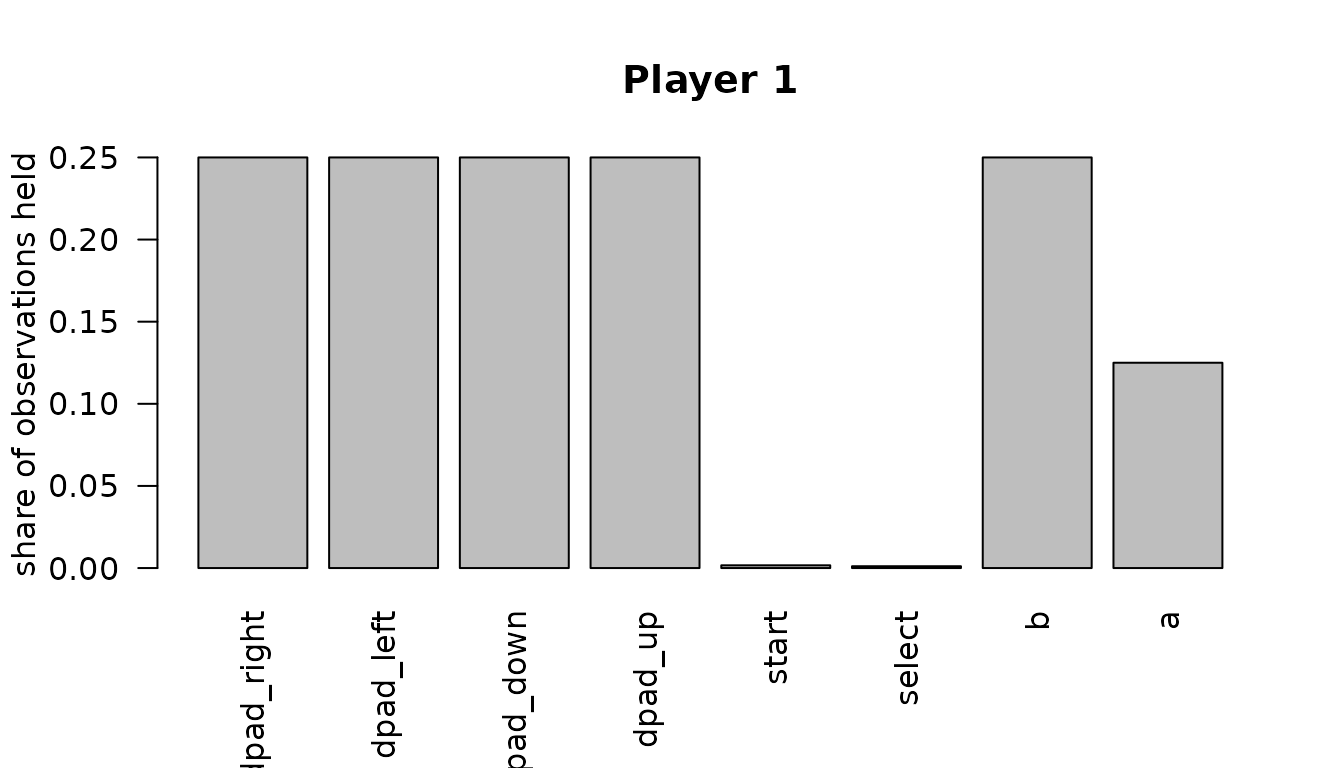
A recording can also be cut: movie[1:600] keeps the
first 600 observations and is again a recording, on which every function
works, and as.data.frame() gives one row per observation
with the controls and numeric channels of a player.
Control identities
The columns of a recording are compact: they hold the controls of its
device and no others. button_layout() says which control
each column is, with a key, a label as on the device, and an ID from a
shared registry:
button_layout(movie)
#>   column id        key mnemonic   name   kind
#> 1      1  1 dpad_right        R  Right button
#> 2      2  2  dpad_left        L   Left button
#> 3      3  3  dpad_down        D   Down button
#> 4      4  4    dpad_up        U     Up button
#> 5      5  5      start        T  Start button
#> 6      6  6     select        S Select button
#> 7      7  7          b        B      B button
#> 8      8  8          a        A      A button
The IDs make controls comparable across recorders. The same rules
decide in every reader which controls share an ID, so a console’s
buttons have the same IDs whichever emulator recorded them. A button
that carries a letter or word of the registry, such as A, B, Start or
Select, has that ID, wherever it sits on the pad; PlayStation buttons,
which carry shapes, have the IDs of the SNES buttons in the same places;
numbered buttons follow a fixed order. The compatibility guide,
vignette("compatibility", package = "replayr"), lists every
rule and every device.
Controls of other devices take the ID of the registry control in the
same role. A light gun’s trigger, for instance, has the ID of the A
button and its offscreen shot that of Y, so that a study can compare it
with a pad; aliases = FALSE keeps the device’s own controls
with qualified IDs instead. When several controls of a recording share
an ID, their column is active when any of them is pressed.
gun <- system.file("extdata", "paper", "light-gun.bk2", package = "replayr")
button_layout(read_movie(gun))[, c("id", "key", "name")]
#>   id key           name
#> 1  7   b              A
#> 2  8   a        Trigger
#> 3 10   y Offscreen Shot
button_layout(read_movie(gun, aliases = FALSE))[, c("id", "key", "name")]
#>                       id            key           name
#> 1                      7              b              A
#> 2    control:gun_trigger    gun_trigger        Trigger
#> 3 control:offscreen_shot offscreen_shot Offscreen Shot
Recordings of different devices have different columns.
align_buttons() puts a list of recordings into matrices
with the same columns, filling the controls that a recording lacks with
FALSE. A shared ID says that two buttons are the same
control, not that they do the same thing in a game; what a button means
remains a question for the analysis. Some recordings store what the game
was asked to do rather than which button was pressed: a Doom
demo records attacking and using, whatever keys the player had bound.
Such controls have the kind action and IDs of their own,
such as action:attack.
Time
An observation is a video frame in most console recordings, a tic of
the game in a Doom demo, an event in some computer recordings,
and a poll of the controller in others. observation_unit()
names it, and recording_info() reports the platform, the
video standard, the frame rate and the number of rerecords under one
name each, whatever the format calls them:
observation_unit(movie)
#> [1] "frame"
recording_info(movie)
#>   format platform video_standard  unit observations frame_rate
#> 1    fm2      NES           NTSC frame         3600   60.09881
#>   frame_rate_source duration rerecords
#> 1          platform 59.90135         0
range(observation_time(movie))
#> [1]  0.00000 59.88471
observation_time() gives the time of every observation
in seconds. It takes the times stored in the recording where there are
any, as in libTAS, JPC-RR and openMSX recordings, and otherwise the
frame rate of the console and its video standard;
frame_rate_source says which. Where neither is known, no
rate is assumed:
observation_time(movie, fallback_rate = 60) names one, and
controller polls, whose number per frame varies, have no time.
Sticks, mice and other numeric channels
Not every input is a button. analog_channels() returns
the numeric channels of a player, such as the axes of sticks, the
movement of a mouse, touch positions or motion sensors, in the units of
the recording. Their columns are named by key, so the X axis of a left
stick is left_x in every format;
channel_layout() lists them beside the recording’s own
labels. In this artificial recording of a Saturn mouse, the left button
is held while the mouse moves:
mouse <- read_movie(system.file("extdata", "paper", "mouse-drag.bk2",
  package = "replayr"))
channel_layout(mouse)
#>   column      key                   name
#> 1      1 mouse_dx P1 Motion Left / Right
#> 2      2 mouse_dy    P1 Motion Up / Down
held <- player(mouse)[, "a"]
head(analog_channels(mouse)[held, ], 3)
#>      mouse_dx mouse_dy
#> [1,]        1        0
#> [2,]        1       -1
#> [3,]        1        0
The common keys are:
| Key | Measurement |
|---|---|
left_x, left_y, right_x,
right_y
|
Axes of the analogue sticks; the N64 stick, the 3DS Circle Pad and the Nunchuk stick are the left stick |
left_trigger, right_trigger
|
Analogue triggers |
mouse_dx, mouse_dy
|
Movement of a mouse since the previous observation
(mouse_x, mouse_y are positions) |
touch_x, touch_y
|
Position on a touch surface |
aim_x, aim_y
|
Where a light gun points |
accel_x, accel_y, accel_z;
gyro_x, gyro_y, gyro_z
|
Motion sensors |
A stick can also become directions.
read_movie(analog = "cardinal8") adds eight direction
columns per stick to the buttons, "cardinal4" four, and
"angle" and "angle+magnitude" add the stick’s
direction in degrees and its distance from the centre to
stick_channels(). A pair such as
c(left = "angle+magnitude", right = "cardinal8") treats the
two sticks differently, and deadzone sets how far a stick
must move before it counts:
dtm <- system.file("extdata", "sample.dtm", package = "replayr")
gc <- read_movie(dtm, analog = c(left = "angle+magnitude", right = "cardinal8"))
head(stick_channels(gc), 3)
#>      left_angle left_magnitude right_direction
#> [1,]   0.000000      0.5468750              NA
#> [2,]   1.636577      0.5470982              NA
#> [3,]   3.270488      0.5477671              NA
grep("^right_", colnames(player(gc)), value = TRUE)
#> [1] "right_e"  "right_ne" "right_n"  "right_nw" "right_w"  "right_sw" "right_s"
#> [8] "right_se"
Numeric values keep the range and unit of their source; converting
the counts of a Wii Remote’s motion sensors into physical units, for
instance, needs the device’s calibration. The help page of
read_movie() gives the defaults and their reasons.
Several players and unassigned polls
A recording can hold several players, and
player(movie, 2) returns the second. Some formats, such as
GameCube recordings with several controllers, store a sequence of
controller polls without saying which port each poll came from. replayr
then returns an object of class replayr_poll_stream instead
of a movie, and polls() lists the polls with their port
left unknown:
polls_path <- system.file("extdata", "paper", "unassigned.dtm",
  package = "replayr")
head(polls(read_movie(polls_path)), 3)
#>   poll port dpad_right dpad_left dpad_down dpad_up start     b     a     x
#> 1    1   NA      FALSE     FALSE     FALSE   FALSE FALSE FALSE  TRUE FALSE
#> 2    2   NA      FALSE     FALSE     FALSE   FALSE FALSE  TRUE FALSE FALSE
#> 3    3   NA      FALSE     FALSE     FALSE   FALSE FALSE FALSE FALSE FALSE
#>       y    l1    r1     z left_trigger right_trigger left_x left_y right_x
#> 1 FALSE FALSE FALSE FALSE            0             0    128    128     128
#> 2 FALSE FALSE FALSE FALSE           10            20    200    160     100
#> 3 FALSE FALSE FALSE FALSE            0             0    128    128     128
#>   right_y commands is_connected get_origin
#> 1     128        0         TRUE      FALSE
#> 2      80        0         TRUE      FALSE
#> 3     128        0         TRUE       TRUE
When the order in which the controllers were polled is known, the
argument controller_order assigns the polls to players.
Formats and files
replayr reads 33 recording formats under 37 file extensions.
supported_formats() lists them; with
details = TRUE it names the reader and the emulator of
each, and the platform where a format serves one console:
head(supported_formats(details = TRUE))
#>   extension structure    reader         emulator platform
#> 1      .fm2      .fm2  read_fm2            FCEUX      NES
#> 2      .bk2      .bk2  read_bk2          BizHawk     <NA>
#> 3      .fcm      .fcm  read_fcm             FCEU      NES
#> 4     .lsmv     .lsmv read_lsmv            lsnes     <NA>
#> 5      .gmv      .gmv  read_gmv             Gens      GEN
#> 6      .vbm      .vbm  read_vbm VisualBoyAdvance     <NA>
The extension of a file decides its reader. A recording under another
extension is recognised by its content where its format has a signature,
as most binary formats do, and recording_format() says
which files of a folder are recordings. A format without a signature,
such as a Doom demo, is named with
read_movie(path, format = "lmp"). A download that bundles
several recordings in a ZIP archive is listed with
movie_members(), and one of its recordings read with
read_movie(path, member = ). Very long BizHawk recordings
can be processed in parts with read_bk2_chunks(), which
hands each part to a function of the analyst’s.
Further guides
-
vignette("compatibility", package = "replayr")lists the platforms, formats, versions and devices that replayr reads, the rules for the IDs of controls, and the recordings used to check them. - The pisa package analyses the input that replayr reads: it maps controls to the actions of a game and compares players with the methods of stylometry.